Digital Travel Protection: Essential Tips for Staying Safe on the Go
Traveling opens up a world of adventure and discovery. But as much as I love exploring new places, I also know how important it is to protect myself digitally while on the move. Digital travel protection is not just about keeping your devices safe; it’s about safeguarding your personal information, your privacy, and your peace of mind. Whether you’re a solo adventurer, travelling with family, or a modern nomad, these digital travel safety tips will help you stay secure and confident wherever you go.
Why Digital Travel Protection Matters
When you travel, you rely heavily on your devices. Smartphones, tablets, and laptops become your maps, your guides, your wallets, and your communication tools. But this convenience comes with risks. Public Wi-Fi networks can be insecure, cybercriminals can target travellers, and losing a device can mean losing access to sensitive data.
Digital travel protection means taking steps to reduce these risks. It’s about being proactive and prepared. For example, I always make sure my devices are encrypted and backed up before I leave. I use strong, unique passwords and enable two-factor authentication on all my accounts. These simple actions make a huge difference.
By focusing on digital travel protection, you can enjoy your trip without constantly worrying about cyber threats or data loss. It’s about making your journey safer and smoother.
Practical Digital Travel Protection Tips You Can Use Today
Here are some of the most effective digital travel protection strategies I use and recommend:
1. Secure Your Devices with Strong Passwords and Biometrics
Your devices are the gateway to your digital life. Protect them with strong passwords or passcodes. Avoid simple PINs like “1234” or “0000.” Instead, use a combination of letters, numbers, and symbols. If your device supports it, enable biometric locks such as fingerprint or facial recognition. These add an extra layer of security that’s hard to bypass.
2. Use a VPN on Public Wi-Fi
Public Wi-Fi is convenient but often unsafe. Hackers can intercept your data on open networks. A Virtual Private Network (VPN) encrypts your internet connection, making it much harder for anyone to spy on your online activity. I always connect to a trusted VPN when using public Wi-Fi, whether in airports, cafes, or hotels.
3. Keep Software and Apps Updated
Software updates often include security patches. Before you travel, update your operating system, apps, and antivirus software. This reduces vulnerabilities that hackers might exploit. I set my devices to update automatically, so I don’t have to remember to do it manually.
4. Limit What You Share Online
It’s tempting to share your travel experiences in real time on social media. But broadcasting your location can make you a target for theft or scams. I recommend posting photos and updates after you’ve left a location. Also, review your privacy settings to control who can see your posts.
5. Backup Your Data Regularly
Losing your device or having it stolen can be devastating. Regular backups ensure you don’t lose important photos, documents, or contacts. Use cloud services or external drives to back up your data before and during your trip. I keep a copy of essential documents like my passport and travel insurance in a secure cloud folder.

Protecting Your Personal Information While Abroad
Your personal information is valuable. Identity theft and fraud are real threats, especially when you’re travelling. Here’s how I protect my data:
1. Avoid Using Public Computers for Sensitive Tasks
Public computers in libraries or internet cafes might be infected with malware or keyloggers. I never use them to access banking sites or enter passwords. If you must use a public computer, change your passwords immediately afterward.
2. Use Two-Factor Authentication (2FA)
Two-factor authentication adds a second step to logging in, such as a code sent to your phone. This makes it much harder for someone to access your accounts, even if they have your password. I enable 2FA on all my important accounts, including email, banking, and social media.
3. Be Wary of Phishing Scams
Phishing emails or messages try to trick you into revealing personal information. When travelling, you might receive fake alerts about your bank or travel bookings. Always verify the sender’s address and avoid clicking on suspicious links. If in doubt, contact the company directly through official channels.
4. Use Secure Payment Methods
Credit cards often offer better fraud protection than debit cards. I prefer using credit cards or mobile payment apps with strong security features. Avoid carrying large amounts of cash or using unfamiliar payment methods.
Managing Your Devices and Data on the Road
Keeping your devices safe while travelling requires some planning and smart habits.
1. Carry Minimal Devices
The fewer devices you carry, the less you risk losing or having stolen. I usually travel with just my smartphone and a lightweight tablet. If I need a laptop, I make sure it’s well protected with a sturdy case and never leave it unattended.
2. Use Device Tracking and Remote Wipe Features
Most smartphones and laptops have tracking features that help you locate them if lost or stolen. I activate these features before I travel. If my device goes missing, I can lock it remotely or erase sensitive data to prevent misuse.
3. Encrypt Sensitive Files
Encryption scrambles your data so only you can access it. Many devices have built-in encryption options. I encrypt sensitive files like travel documents, passwords, and financial information. This way, even if someone gets hold of my device, they can’t easily access my private data.
4. Be Careful with Charging Stations
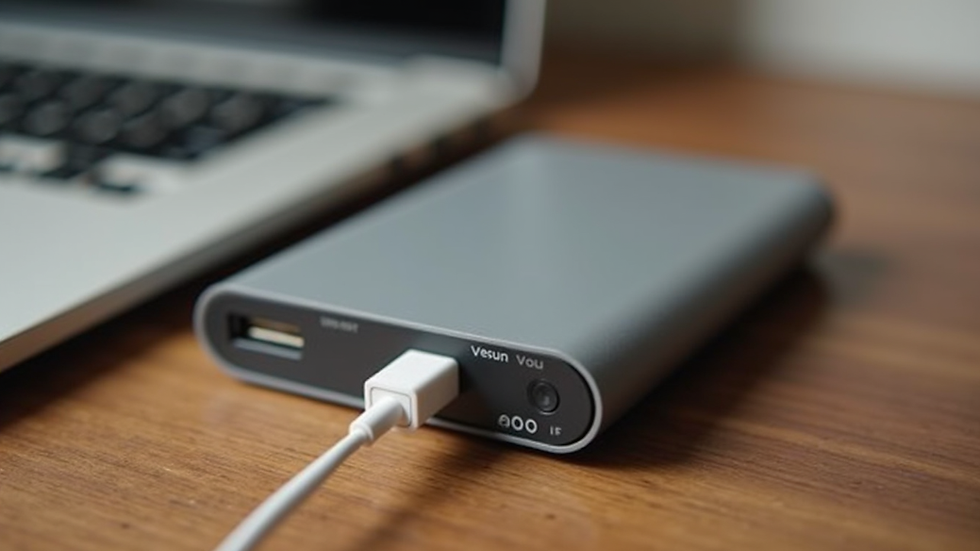
Public charging stations or USB ports can be risky. Some hackers use “juice jacking” to steal data through charging cables. I carry a portable power bank and use my own charger and cable. If I must use a public station, I use a USB data blocker to prevent data transfer.
Staying Safe Without Relying Solely on Technology
While technology helps us stay connected, it’s important not to rely on it completely. Here are some tips to stay safe even if your devices fail:
Keep physical copies of important documents like your passport, travel insurance, and emergency contacts.
Share your itinerary with a trusted friend or family member so someone knows where you are.
Learn basic phrases in the local language to ask for help if needed.
Stay aware of your surroundings and trust your instincts.
Have a backup plan for communication, such as a local SIM card or a payphone.
By combining digital travel protection with practical, offline safety measures, you can travel confidently and enjoy your adventures fully.
Empowering Your Travel Experience with Digital Safety
Travel is about freedom and discovery. Digital travel protection lets you embrace that freedom without fear. By following these tips, you reduce risks and keep your digital life secure. Remember, safety is not just about technology - it’s about being prepared, aware, and smart.
If you want to dive deeper into digital travel safety, check our this digital travel safety blog for more insights and advice. Staying informed is one of the best ways to protect yourself.
Travel smart, stay safe, and enjoy every moment of your journey!


Comments